
Hollis & Grain is a made-up shop for this demo, not a real business.
Tools used and what they cost
| Tool | Used for | Cost in this demo |
|---|---|---|
| Netlify | Hosts the line sheet page and collects wholesale orders with Netlify Forms | Free plan: $0, 300 credits a month. Our 5 production deploys this month used 75 credits at 15 each. Form submissions are free on credit-based plansChecked Nov 15, 2026 · source |
| Pexels | Product and workshop photos for the demo | Free to use under the Pexels license. We credit the photographers on the pageChecked Nov 15, 2026 · source |
Hollis & Grain is a demo shop, not a real business. It makes four oak and ash boards, and nothing on its pages is for sale. We built its wholesale line sheet to answer one question that comes up after every pitch email: the buyer is interested, so what exactly do you send them, and where does it live?
You can open the result on your phone at hollis-grain-demo.netlify.app/wholesale/. It’s the page a boutique buyer would get from the link in our boutique pitch email templates.
Why this trips up new brands
Getting a line sheet into a buyer’s hands sounds easy until you try to sell to shops from a store that wasn’t built for it. On the Shopify Community, owners keep asking the same few things:
- One wanted “password protected wholesale store” pricing behind a single page with an order form and no checkout.
- Another asked for a password on “just need a single page not entire store”, because Shopify’s private mode locks the whole storefront.
- A brand selling to around 40 shops said buyers text or message their reorders instead of logging into a portal, and asked how to get those orders in without one (thread).
- Another said boutiques send loose, unformatted purchase orders by email that have to be typed in by hand (thread).
So the line sheet has two jobs: show the buyer everything they need to say yes, and make it easy for them to send you a clean order.
What goes on a line sheet
Faire, which runs a wholesale marketplace for independent shops, lists what a line sheet should hold: a photo of each product, SKUs, wholesale and suggested retail prices, minimums and case sizes, and ordering information and terms. That’s the same list our pitch guide uses.
Indie Retail Academy, which trains independent shop owners, puts the style in four words: “Retailers like boring line sheets.” A buyer is comparing your numbers with ten other brands, on a phone, between customers. They want to find the price and the minimum fast.
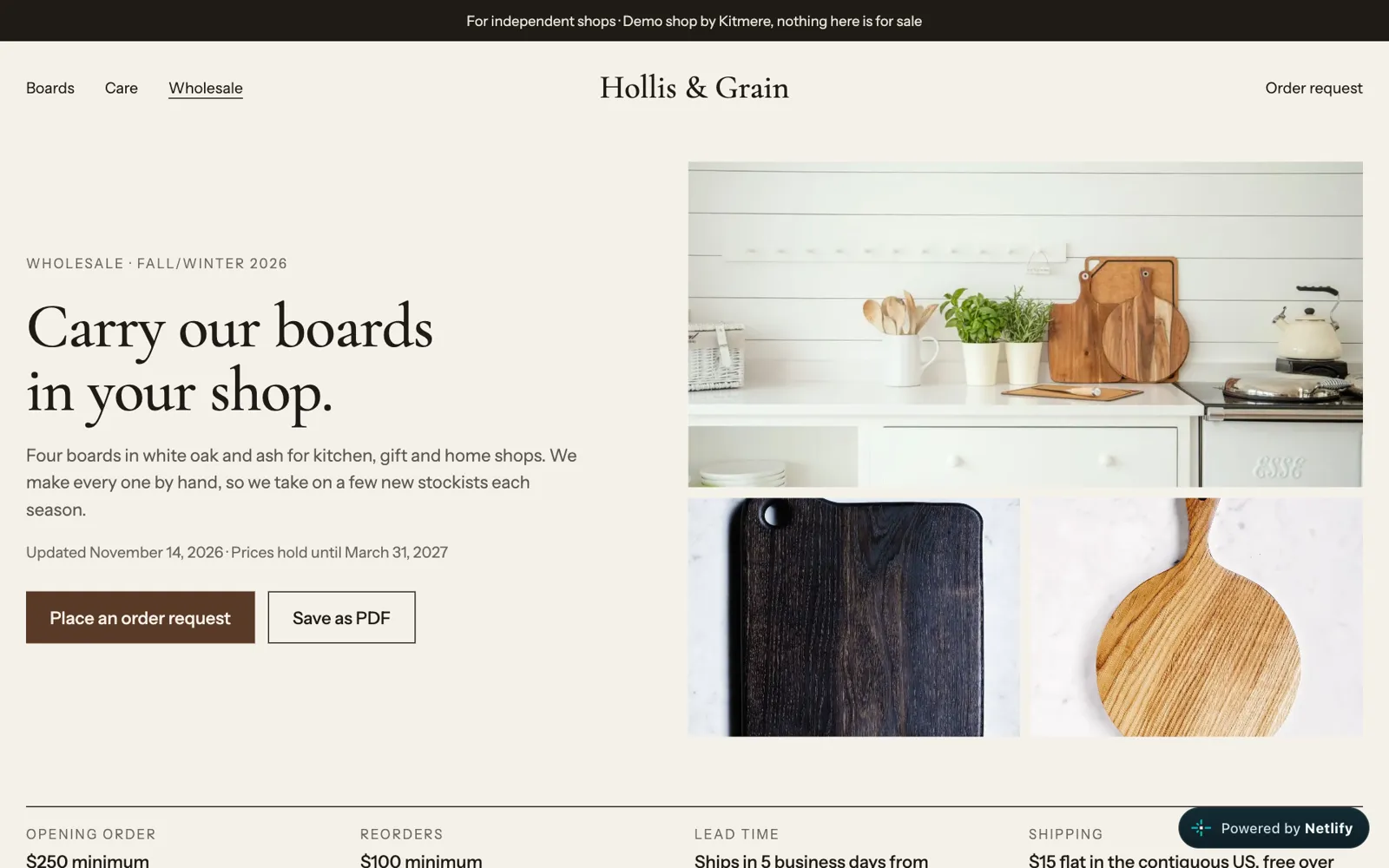
Here is how we laid out the Hollis & Grain sheet, top to bottom:
- What it is and when the prices end. “Wholesale · Fall/Winter 2026”, the date it was last updated and the date prices hold until. A buyer who opens the link in March knows if it’s current.
- Terms, in six boxes. Opening order minimum ($250), reorder minimum ($100), lead time (ships in 5 business days), shipping ($15 flat, free over $500), payment (card on the first invoice, Net 30 from the third order) and damages (send a photo within 7 days and we replace it).
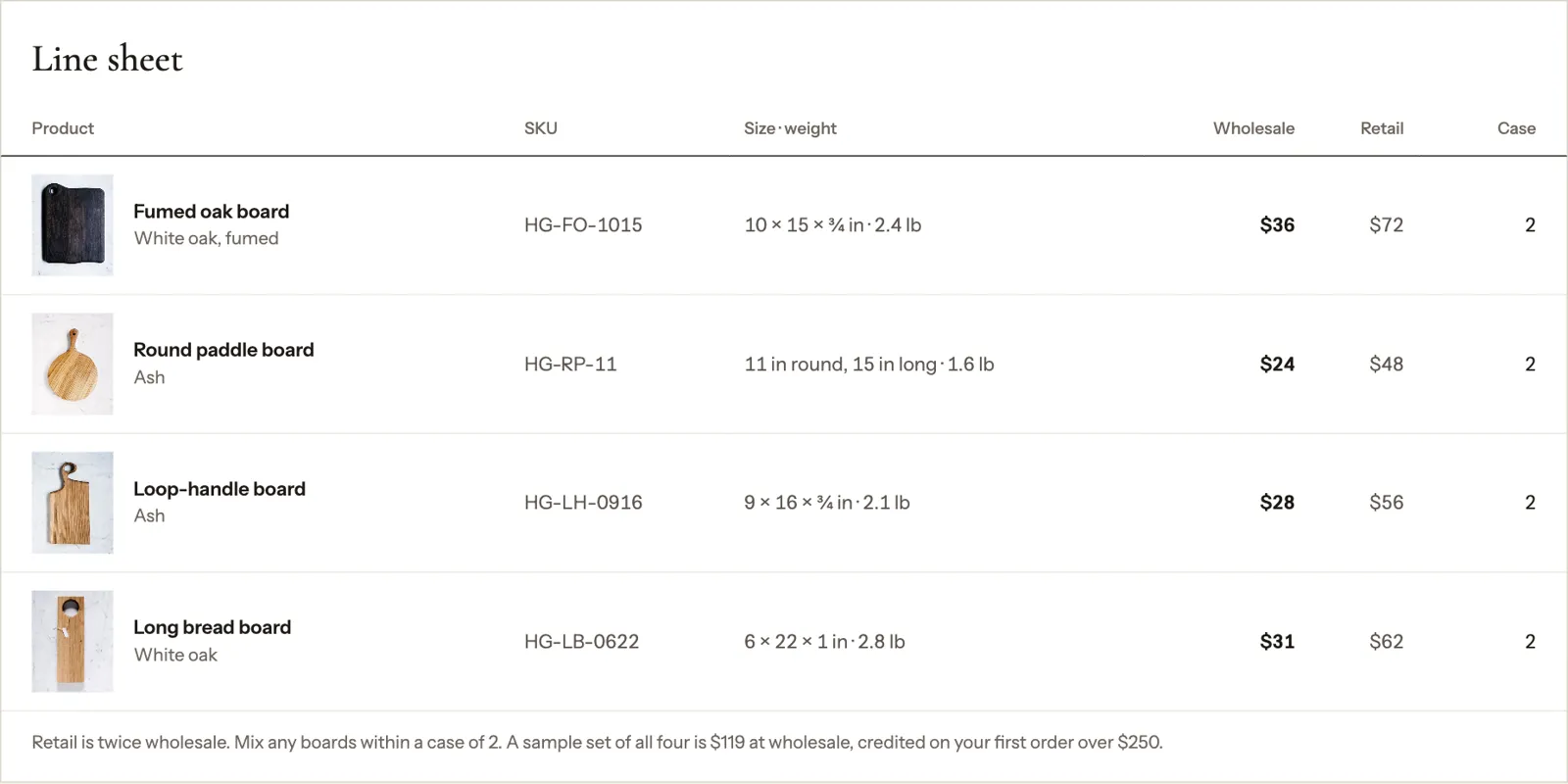
- The product table. Photo, name and wood, SKU, size and weight, wholesale price, retail price and case pack.
- What’s in every case. A care card on each board, a kraft sleeve with SKU and barcode, a link to product photos the shop can use, and a shelf card on request. Buyers ask about these after they’ve seen the prices, so we answer them on the sheet.
- Questions from buyers. Do you sell on Faire, can I see samples, do you keep shops apart, do you drop ship, how fast are reorders.
- The order form.
Numbers that have to agree
Most of the work is deciding numbers, not design. Check these before you publish:
- Wholesale is about half of retail. Shops usually double their cost to set the shelf price (keystone pricing). Our boards are $72, $48, $56 and $62 at retail and $36, $24, $28 and $31 at wholesale.
- The minimum is reachable. Faire suggests keeping first-order minimums on the lower end and case sizes under 10 units. Our cases are 2 boards, so a $250 opening order is about 8 boards.
- The sample offer adds up. We offer all four boards as a sample set at wholesale ($119) and credit it on a first order over $250. That’s 36 + 24 + 28 + 31.
- Weights are there for shipping. Shops planning shelf space and shipping like to see size and weight in the same column.
Where to keep it: four options
| Option | Good for | Watch out for |
|---|---|---|
| PDF (from Canva, Docs or Slides) | Your first few pitches | Every price change means a new file, and an attachment may never get opened |
| Canva view link | Quick to share, no file | It’s a design file in a browser, with no way to take an order |
| Shopify B2B (Basic and up) | Brands already on Shopify | Set-up time: companies, catalogs, price lists. Basic, Grow and Advanced allow up to 3 active B2B market catalog assignments |
| A line sheet web page with an order form | Etsy, Squarespace or Wix sellers, or no store yet | You build it once, from a template like ours |
Two details from the official pages decide a lot here. Shopify’s help center says you can use Shopify B2B on the Basic, Grow, Advanced and Plus plans, and that most B2B features, including companies, catalogs, net payment terms and self-serve ordering, are on all of them. So if you’re already on Shopify Basic, start there. And Etsy shut down Etsy Wholesale on July 31, 2018, so Etsy sellers have nothing built in.
For everyone else, a web page is the cleanest answer: one link that’s always current, readable on a phone, that prints to a PDF and takes the order.
The order form: get a clean order
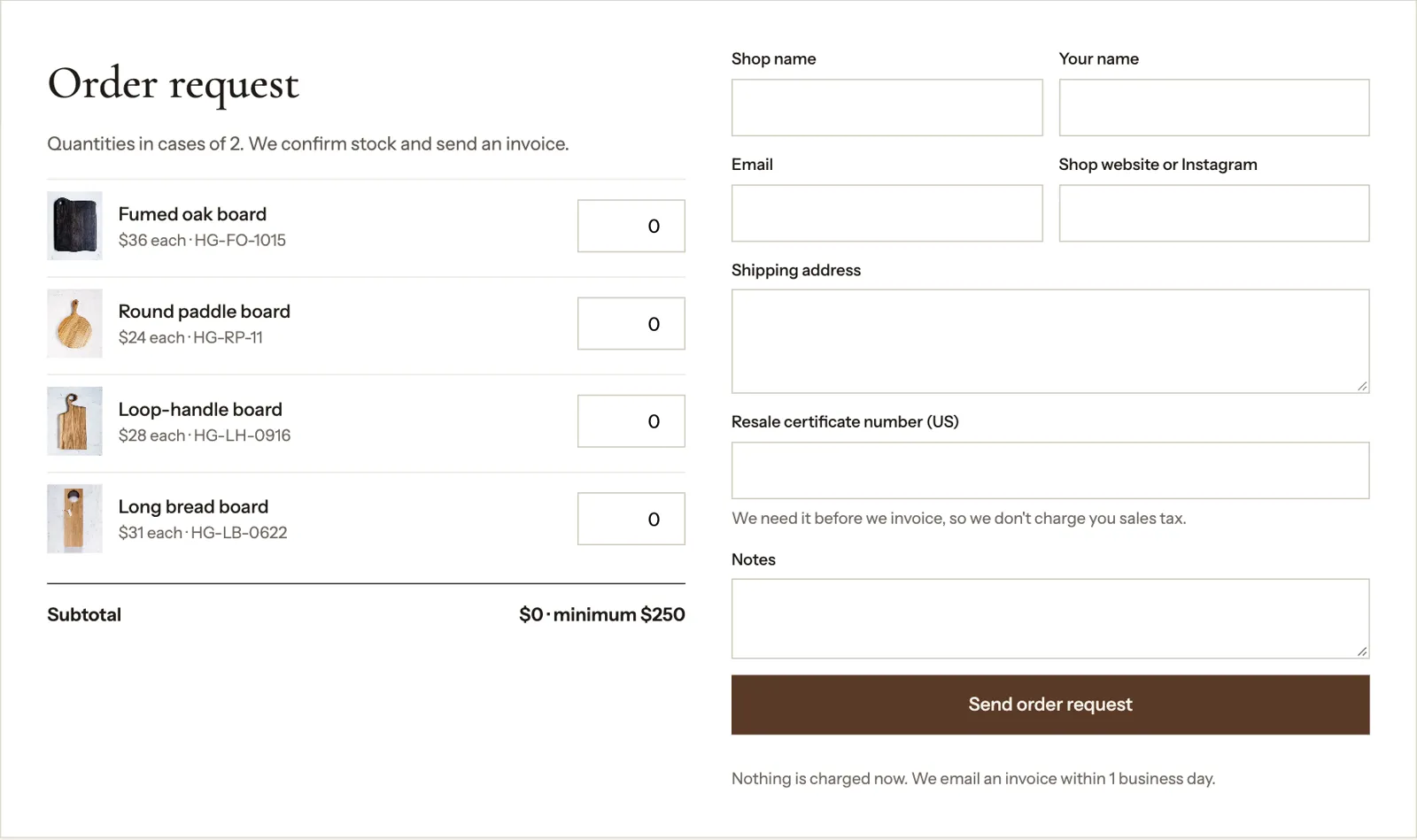
Our form sits under the table. For each product there’s a quantity box that counts in cases of 2, and a subtotal that updates as the buyer types: “$144 · $106 more to reach $250”, then “$302 · minimum met”. Under it are the fields we’d need to invoice: shop name, buyer’s name, email, the shop’s website or Instagram, shipping address, resale certificate number and notes.
Two rules run in the page before the order is sent:
- An order with nothing in it is stopped with “Add at least one case.”
- An opening order under $250 is stopped with a message saying how much more to add. If the buyer writes “reorder” in the notes, the order goes through, because reorders have a $100 minimum.
The resale certificate field is there for US shops. A shop buying to resell usually gives you its resale certificate so you don’t charge it sales tax; asking on the form saves an email later. Our sales tax guide covers when you need to collect tax at all.
Put it online on Netlify: what we did
We hosted the page on Netlify’s free plan. The forms come with it: Netlify reads any HTML form marked data-netlify="true" when you deploy and stores what buyers send, so you don’t need a form app.
- Create the project. One command made
hollis-grain-demowith the free address hollis-grain-demo.netlify.app. - Turn on form detection first. When we checked the new project’s settings, form detection was off. Netlify’s form docs say it only picks up forms from the next deploy after you turn it on, so do it before the first deploy, or deploy again afterwards.
- Deploy the folder. Our final site is 26 files, under 1 MB: seven pages, nine photos plus small copies for thumbnails, and a two-line
netlify.tomlthat says there’s nothing to build. Each deploy took 12 to 14 seconds, including starting the command-line tool. - Check it’s public. Our project opened for everyone straight away. Netlify’s changelog says that since July 28, 2026, new teams on the Free, Personal and Pro plans start with private projects. If you see a login page, click Make public on the project.
- Send a test order. From a phone-size browser we ordered 4 fumed oak, 4 round paddle and 2 long bread boards. The thank-you page loaded and the order appeared in Netlify’s Forms tab with every quantity, the $302 subtotal, the shop name and the test resale number. Netlify also stored the IP address, browser and referring page, so mention form data in your privacy policy.
If you’d rather not use a terminal, Netlify’s Drop quickstart describes dragging the folder onto app.netlify.com/drop. It says a Drop site made without signing in sits behind a temporary password until you claim it. We didn’t test Drop for this demo.
One more thing we saw: test orders sent by an automated script reached the thank-you page but never showed up in Netlify, while every order from a normal browser did. We didn’t confirm why. Netlify’s docs say all submissions go through Akismet spam filtering. Test from your own phone.
Get the orders in your inbox
Netlify collects the orders; it doesn’t send them anywhere by default. Its notifications docs say you can send each submission to an email address, a webhook or Slack. Turn on an email notification for the wholesale-order form so each order arrives in your inbox, then reply with the invoice.
A PDF from the same page
Some buyers still want a file. The “Save as PDF” button opens the browser’s print dialog. A print stylesheet hides the menu, buttons, order form and footer, and adds one line with the order link and email. What’s left is the terms, the table, what’s in every case and the buyer questions.
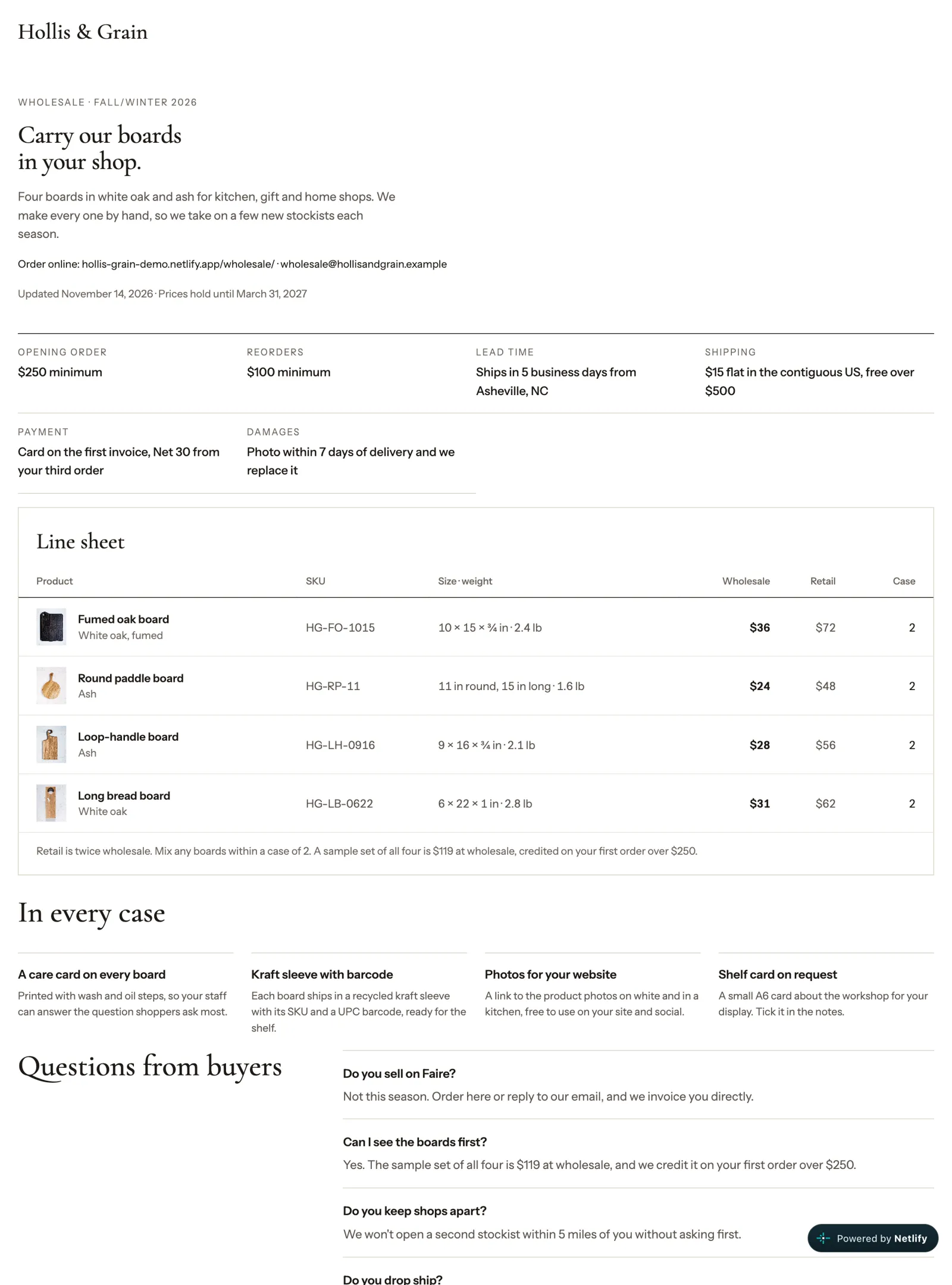
So when a buyer replies “can you send the line sheet as a PDF?”, you print once and attach it, and the link in your email signature still has the current prices.
Use our template
Download the line sheet template (15 files, 522 KB). It has the wholesale page, the thank-you page, the photos and the netlify.toml. Open wholesale/index.html in a plain text editor and change:
- the brand name, intro and the dates the prices hold
- the six terms
- each product row, in two places: the line sheet table and the order form (
data-priceis the wholesale price the subtotal uses) - the “In every case” items, buyer questions and email addresses
Then delete the demo bar at the top and the demo line in the footer, replace the photos with your own, and put the folder online. The README in the zip lists the same steps.
What we didn’t test
We didn’t send this line sheet to real shops, so we have no reply or order numbers. We didn’t test Netlify Drop, a custom domain or email notifications; those steps come from Netlify’s docs. Shopify B2B is described from Shopify’s help center, not set up by us. The products, prices, terms and addresses on the demo are examples.
Before you send the link to a buyer, place one test order from your own phone. It takes two minutes, and it’s the only way to know the form, the subtotal and the thank-you page all work.