
Hollis & Grain is a made-up shop for this demo, not a real business.
Tools used and what they cost
| Tool | Used for | Cost in this demo |
|---|---|---|
| Netlify | Hosts the link page and collects email signups and orders with Netlify Forms | Free plan: $0, 300 credits a month. The whole demo site has used 75 credits for 5 deploys this month. Form submissions are free on credit-based plansChecked Nov 15, 2026 · source |
| Linktree | The common alternative we compare against (not used in the demo) | Free plan with unlimited basic links; Starter $7/month billed yearly ($9 monthly); Pro $14/month billed yearly ($17 monthly) removes Linktree brandingChecked Nov 14, 2026 · source |
| Pexels | Product and workshop photos for the demo | Free to use under the Pexels license. We credit the photographers on the pageChecked Nov 15, 2026 · source |
Hollis & Grain is a demo shop, not a real business. It makes four oak and ash boards, and nothing on its pages is for sale. We built its link-in-bio page around one question: when someone watches a Reel about a board and taps the link in the profile, what do they expect to land on?
Open it on your phone at hollis-grain-demo.netlify.app/links/. That’s where almost everyone who taps a bio link will see it.
We put the link page at /links/ and kept the home page for the shop itself, the way many brands do (yourstore.com/links). Visitors who type your domain get the full store; only the bio link goes to the short phone page. On a computer, our link page shows as a phone-width card in the middle of the screen.
Start with what the visitor wants
Someone who taps your bio link has just seen one post. They want that thing: what it costs, what it looks like close up, how to get it. A list of six identical buttons (“Shop”, “About”, “Blog”, “Contact”…) makes them guess.
So the Hollis & Grain page is built in this order:
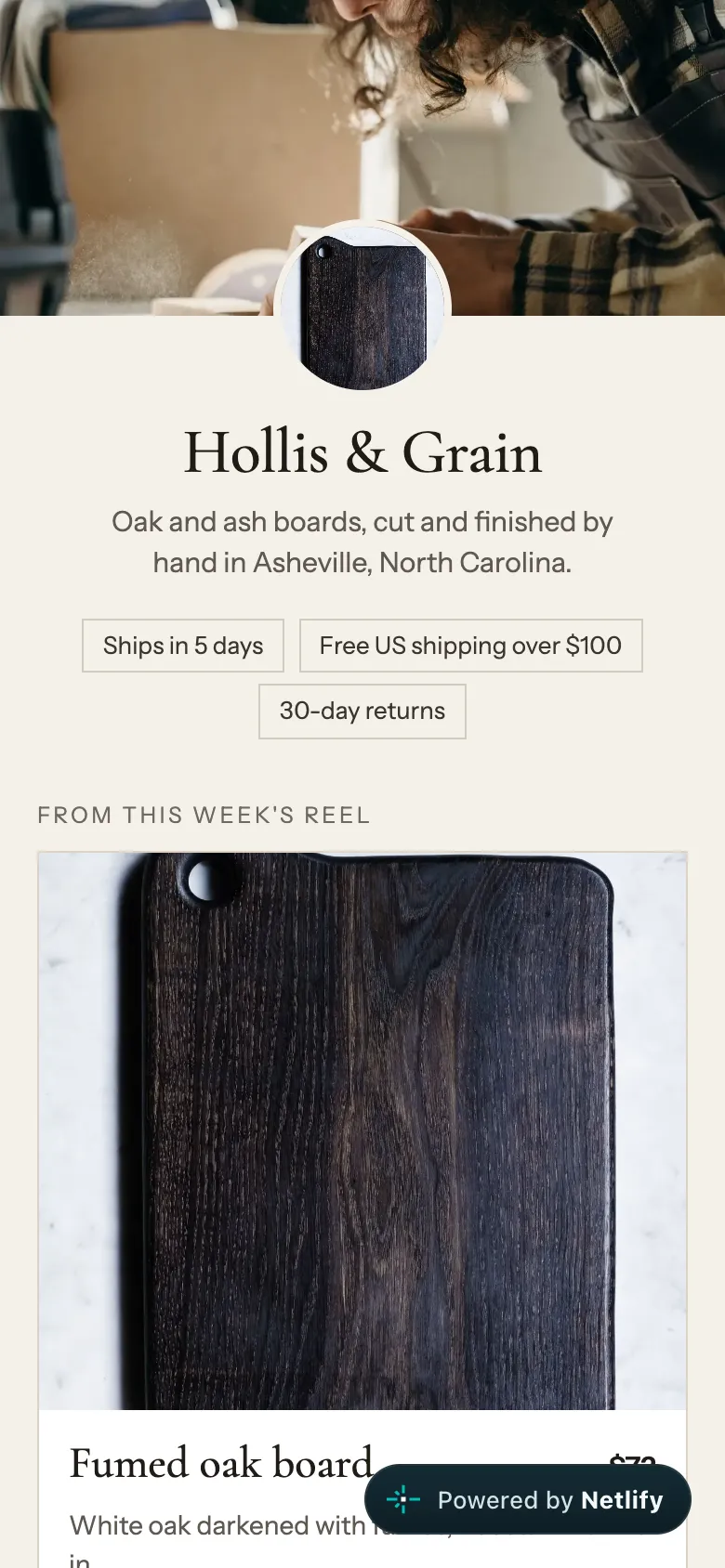
- Who we are, in one line, over a photo of the workshop: “Oak and ash boards, cut and finished by hand in Asheville, North Carolina.” Under it, three short promises: ships in 5 days, free US shipping over $100, 30-day returns.
- The board from this week’s Reel, big, with its photo, price ($72), one line on what makes it different, and a “Shop this board” button. When the next Reel is about another board, this card changes. Nothing else needs to.
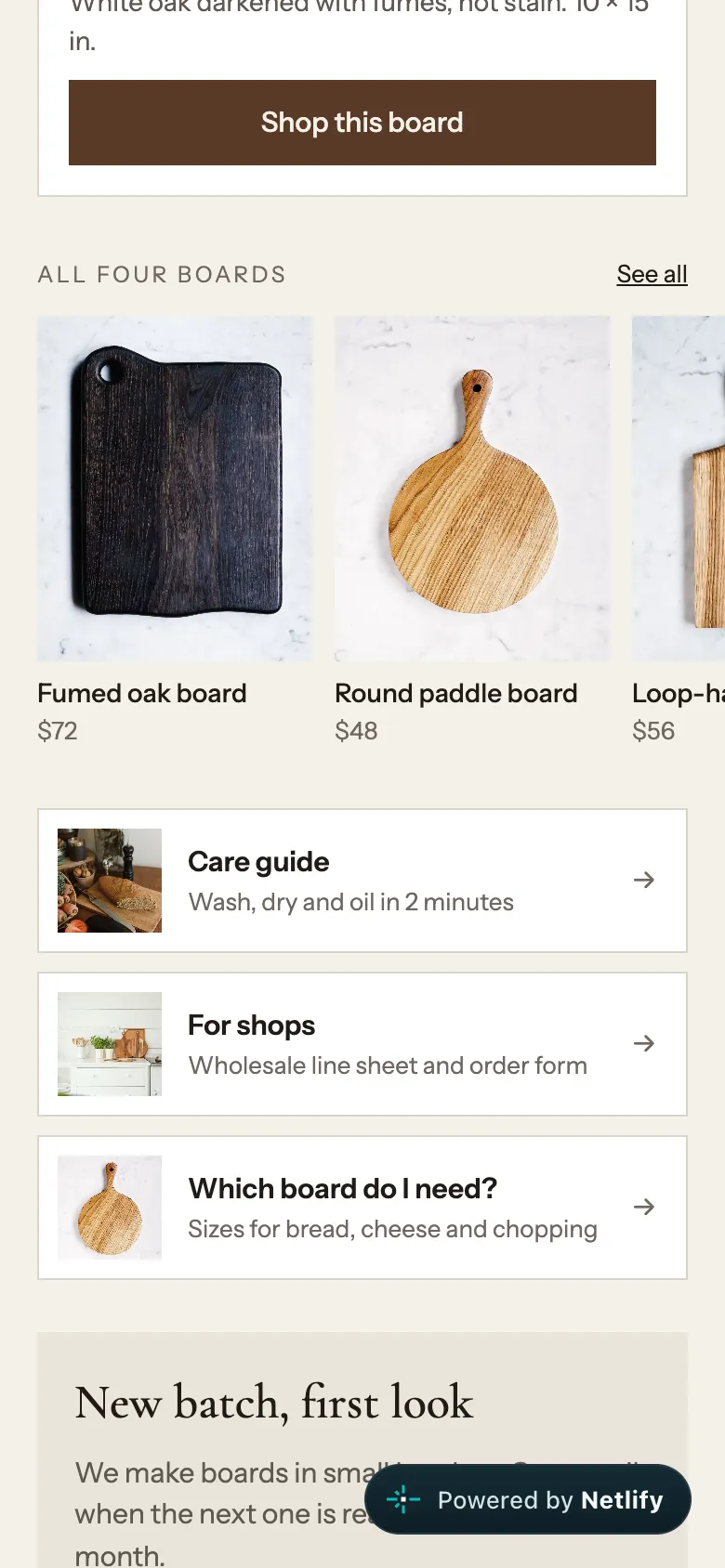
- All four boards as small cards in a row you can swipe, each with a price. Someone who liked the post but not that exact board can still find one.
- Three links people ask for: the care guide, the wholesale line sheet for shops, and “Which board do I need?”. Each has a small photo so it reads at a glance.
- One email signup that says what you’ll get: “One email when the next batch is ready, about once a month.”
We looked at real link pages that small product brands host on their own sites. The most common pattern was a column of same-size text buttons with no photos; one still showed a shop notice from 2021. Those were the two things we designed against.
Problems owners run into
The same questions keep coming up on the Shopify Community:
- “I have struggled to create a link in bio/link tree style” page inside a store theme (thread).
- Others want “something like linktree but through Shopify” (thread).
- One owner said Instagram “flagged it as malicious” and wouldn’t let them post their store link (thread).
- Another asked why TikTok shows a warning that you’re about to open an external website when people tap their store link (thread).
- And one wanted to put their newsletter signup, with its 20% first-order offer, on their link page (thread).
A page you control fixes the first, second and last. The blocked-link and warning problems come from the platforms; we didn’t test whether hosting choices change them, so we won’t claim they do.
Which option fits
| Option | Cost | Good for | Watch out for |
|---|---|---|---|
| Link straight to a product or your store | $0 | One product, or one product per post | You change the link every time the post changes |
| Instagram’s own profile links | $0 | Up to 5 links, today | They show as a plain list, no photos, no signup form |
| Linktree Free | $0 | A quick page of buttons | Paid plans add analytics; Pro ($14/month billed yearly) removes Linktree branding |
| A page in your store (Shopify page) | Included in your plan | Shopify stores | Getting the theme to look like a link page can be fiddly |
| Your own link page on Netlify | $0 on the Free plan | Your design, signup form, order source tracking | You set it up once, from a template like ours |
Instagram’s help center says you can add up to 5 websites to your profile. Linktree’s pricing page lists a free plan with unlimited basic links, Starter at $7 a month billed yearly ($9 monthly), Pro at $14 ($17 monthly) and Premium at $30 ($35 monthly). And if you remember Shopify’s free Linkpop tool: when we checked, linkpop.com redirected to Shopify’s home page.
If one of the first three does what you need, use it. The rest of this guide is for when you want the page to be yours.
Know which post sent the sale
A link page is only useful if you can tell it’s working. The simple way is UTM tags: a few words added to the end of a link that say where the click came from. Google’s Analytics help says to always use utm_source, utm_medium and utm_campaign, and to use one utm_source per platform, such as Instagram or TikTok.
For a bio link that looks like:
https://yourstore.com/?utm_source=instagram&utm_medium=bioUse utm_source=tiktok for the same page in your TikTok profile, and you can compare the two.
Our demo goes one step further. Every shop link on our link page already carries ?utm_source=instagram&utm_medium=bio, and the order form on the shop page reads utm_source from the address and saves it in a hidden field. We opened the shop page with ?utm_source=instagram on the end, ordered a loop-handle board, and the order arrived in Netlify marked from: instagram, with a $65 total ($56 plus $9 shipping). Our email signup on the link page saves from: bio in the same way. No analytics app needed to start.
Put it online on Netlify: what we did
We hosted the whole demo, the link page plus the boards and wholesale pages, on Netlify’s free plan. The email signup is a normal HTML form marked data-netlify="true"; Netlify picks it up when you deploy and stores each signup.
- Create a project. We named ours
hollis-grain-demo, which gave the free address hollis-grain-demo.netlify.app. For a real shop you’d connect a subdomain like links.yourstore.com; Netlify lists custom domains with HTTPS on the Free plan. - Turn on form detection before you deploy. It was off on our new project. Netlify only finds forms on the next deploy after you turn it on.
- Deploy the folder. Each deploy of our 26-file site took 12 to 14 seconds with Netlify’s command-line tool.
- Make it public if needed. Our project was public straight away. Netlify says new teams since July 28, 2026 start with private projects; if you see a login page, click Make public.
- Send a test signup from your phone and check the Forms tab. Ours arrived with the email and
from: bio, plus the IP address, browser and referring page that Netlify stores with every submission. Mention that in your privacy policy.
On the Free plan a small “Powered by Netlify” badge sits in the bottom corner of the page; you can see it in our screenshots.
Netlify also has a ready-made link-in-bio template on its templates page, described as one page for your name, bio and links, ready for Netlify Drop. We built ours from scratch so it could carry products and prices, and didn’t test the template or Drop.
Keep it light
People tap bio links on phones, often on mobile data. Our first build used full-size 1200-pixel photos even for the 56-pixel thumbnails, and the link page weighed 614 KB. We added small 400-pixel copies for every image shown under 160 pixels wide, and the page dropped to 277 KB, photos included. If you build your own, do the same: size each photo for the space it fills.
What we didn’t test
We didn’t put this page in a real Instagram or TikTok profile, so we have no tap or sales numbers. We didn’t test Linktree, a Shopify page, Netlify’s link-in-bio template, Netlify Drop or a custom domain; those details come from their help and pricing pages. The products, prices and email address on the demo are examples.
Whatever you use, open your bio link on your own phone once a week. Make sure the first thing on it is the thing you’re posting about now.